
Note: This News Post was updated and re released on 11th May 2026.
Introducing Sympac
Consolidated Dashboards!
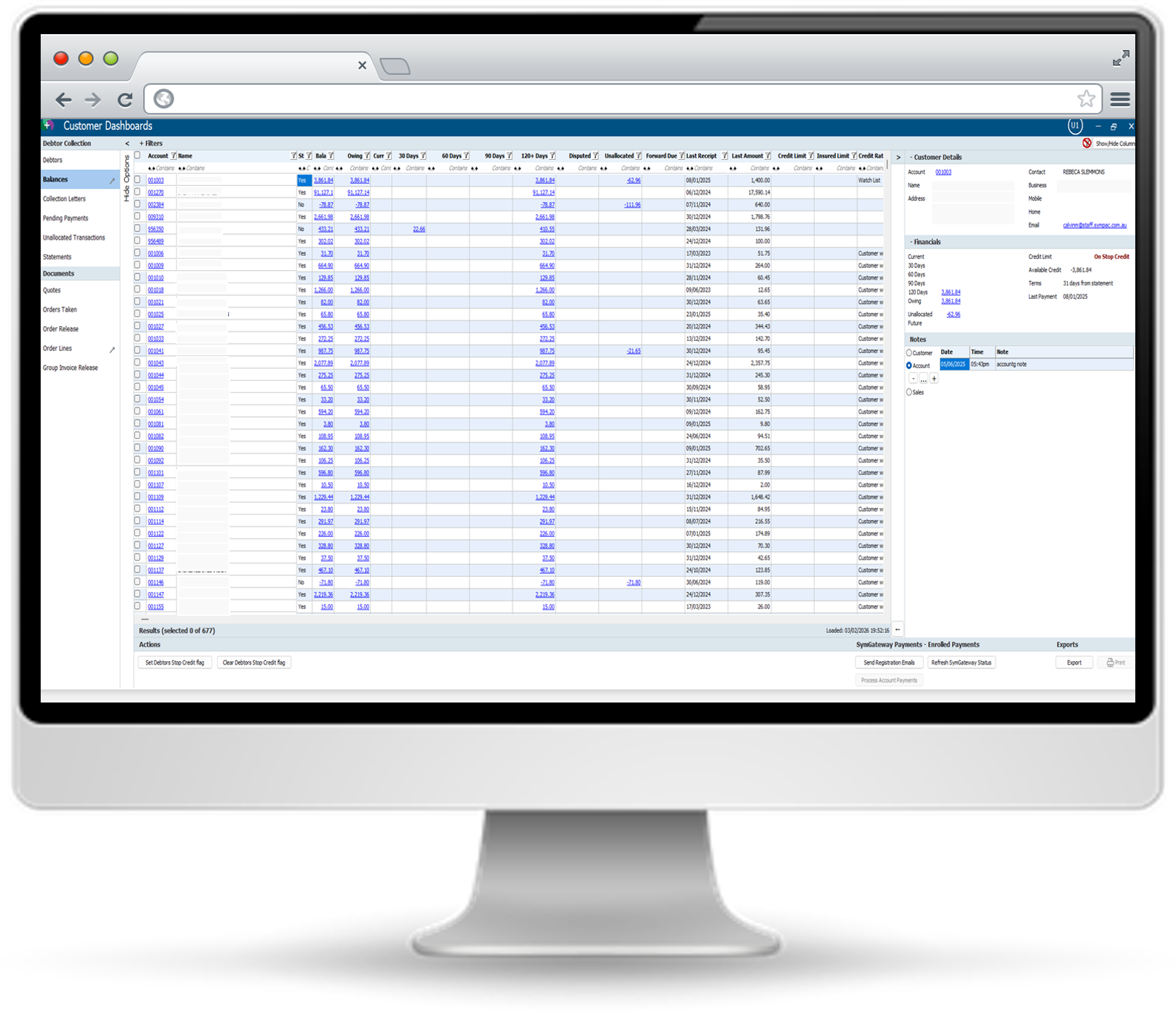
Save Time and Streamline Operations with Intelligent Customer and Product Dashboards
Our new Sympac Dashboards are being rolled out to stores during May and June 2026. To help you prepare, the “Dashboard” Menu in your Sympac Software has been activated.
This early access allows you to:
- Get familiar ahead of time with the new interfaces – see below
- Review training and support materials – see below
- Prepare your dashboard security settings before go-live – click here
To support the rollout
- A series of symlearning courses to support the rollout is now available—helping you quickly understand the value of each dashboard and the efficiency it can bring to your daily workflow.
- Find out more about each dashboard below and how to gain access to the courses.
NEW Customer Dashboards
The Customer Dashboard brings together critical customer-facing processes such as debtors, orders, quotes, and collections into a single, streamlined view – helping you save time, reduce manual effort, and improve operational efficiency.
Here are the key highlights of each of our Customer Dashboards, along with the symlearning courses you can access to support them.
- Debtor Balances
- Collection Letters
- Debtor Statements
- Debtor Balances Overview: Show all debtors or only those with balances, with extensive filtering and column customisation.
- Interactive Grid: Drill down into customer accounts, sort, filter, and move columns.
- Registered Card Payments: Securely send customers links to register cards for automatic payments, process their payments directly, and track status in real time.
- Export & Reporting: Export filtered data to Excel for further analysis.
- Dispute & Stop Credit Management: Mark transactions as disputed, set/clear stop credit flags, manage credit risk efficiently.
- Targeted Communication: Customise lists by aged balances, last letter sent, and more for precise debtor follow-up.
- Automated & Ad Hoc Letters: Schedule letters to send automatically or generate them on demand.
- Custom Templates & Pay By Links: Build tailored templates for email, SMS, or location-specific needs, including Pay By Link!
- Escalation & Credit Actions: Automate stop credit flags or credit rating updates based on letter criteria.
- Export & Reporting: Export customer lists for further analysis.
- Streamlined Statement Production: Quickly generate, email, or print debtor statements with advanced filtering and template selection.
- Pay By Link Integration: Automatically generate secure payment links and QR codes for easy online payments.
- Custom Messaging: Add notes, attach communications, and personalise statements.
- Drill-Down Capabilities: Click blue hyperlinks to view transaction details and customer info.
- Export & Attachments: Export reports to Excel and attach notices to statements.
- Orders Taken
- Orders Line Management
- Customer Quotes
- Order Release
- Centralised Order Management: View, filter, sort, release, cancel, print, and export customer orders from one screen.
- Order Insights: Each row shows a complete customer order with financial and fulfilment details.
- Bulk Actions: Initiate picking, export data, and perform actions on multiple orders.
- Quick Drill-Down: Click order numbers to review full order and line details instantly.
- Granular Order Detail: Each row represents a single product line within a customer order.
- Advanced Filtering & Grouping: Filter by text, date, price, status; group by product, customer, or status.
- Role-Based Actions: Controls for warehouse, customer service, and procurement teams.
- Bulk Updates & Export: Global changes to pick/delivery dates, export to Excel, manage order lines efficiently.
- Collapsible Panels: Drill down to customer delivery details and track statuses.
- Centralised Quote Management: Access all customer quotes in a filterable view.
- Flexible Filters: Date, customer, salesperson, and location filters.
- Bulk & Individual Actions: Flag quotes as lost, export, import, print, update comments or required dates.
- Quick Navigation: Blue hyperlinks open quote details, print, or access related info.
- Efficient Order Review: Consolidated view for reviewing and releasing orders and quotes, focusing on credit management.
- Credit Risk Insights: See each customer’s credit standing and how invoicing affects their credit position.
- Customisable Filters: Filter by agent, group, credit rating, staff responsible, trading group.
- Bulk Release & Export: Select multiple orders for release, export results, print or import data.
- Exception Handling: Manage orders exceeding credit limits, stop credit enforcement, and re-approval processes.
Follow the link to access our Customer Dashboard Learning Pathway on symlearning, here you will find several microlearning and full courses on each of the features of our Customer Dashboards including:
- Balances
- Collection Letters
- Debtor Statements
- Orders Taken
- Order Line Management
- Customer Quotes
- Order Releases
- Quick Guide to Dashboard Filters & Functions
- Plus… we also have a full course available that brings together both the Customer Dashboards and the Product Dashboard so you can learn about all the features in one complete course.
Quick Tip!
- If you’re already registered and using symlearning, simply log in—you’ll find the Learning Pathway has been added to your Learning Dashboard.
- If you’re not yet on symlearning, you can follow the link to quickly register for access. (This gives you access to just this Dashboard Learning Folder – to access the full symlearning suite of over 100 Sympac courses, your store can be registered via the symlearning website)
NEW Consolidated Product Dashboard
The Consolidated Product Dashboard centralises Product Department Maintenance and NSI Review features into one intuitive workspace – simplifying workflows and making it easier to manage product data across your business.
Here are the key highlights of each view withing this Dashboard along with the symlearning courses you can access to support them.
- Department Maintenance
- NSI Review
- All Departments in One Grid: View all departments and locations in a single screen, making it easy to spot gaps and missing departments.
- Add & Remove Departments: Add departments with a single click; removal is prevented if products are attached, ensuring data integrity.
- Visual Change Tracking: Changed rows are highlighted for clarity during updates.
- Business Unit Editing & Link Rounding: Edit business units and manage link rounding within the same menu.
- GL Account Rules & Error Highlighting: Set up GL account rules for automatic generation and highlight incorrect accounts in red for quick correction.
- Grid-Based NSI Management: Load and display Non Stocked Items (NSIs) in a grid for easy review and comparison.
- Advanced Filtering: Filter by department, description, or show actives/deleted items for targeted review.
- Bulk Product Review: Review multiple NSIs at once, identify items needing action, and update product status directly in the grid.
- Hyperlink Navigation: Product codes as blue hyperlinks allow instant access to product details and related information.
- Efficient Maintenance: Most updates can be made directly within the grid, keeping workflow streamlined.
Follow the link to access our Consolidated Product Dashboard Learning Pathway on symlearning, here you will find microlearning on our Product Dashboard including:
- Consolidated Product Dashboard
- Quick Guide to Dashboard Features and Functions
- Plus… we also have a full course available that brings together both the Customer Dashboards and the Product Dashboard so you can learn about all the features in one complete course.
Quick Tip!
- If you’re already registered and using symlearning, simply log in—you’ll find the Learning Pathway has been added to your Learning Dashboard.
- If you’re not yet on symlearning, you can follow the link to quickly register for access. (This gives you access to just this Dashboard Learning Folder – to access the full symlearning suite of over 100 Sympac courses, your store can be registered via the symlearning website)
Security Setup – actions to take now!
Managers should set up security for the dashboards, as they contain information that may not be appropriate for all staff to access and include functions that may not be suitable for all users.
To configure dashboard security follow these steps
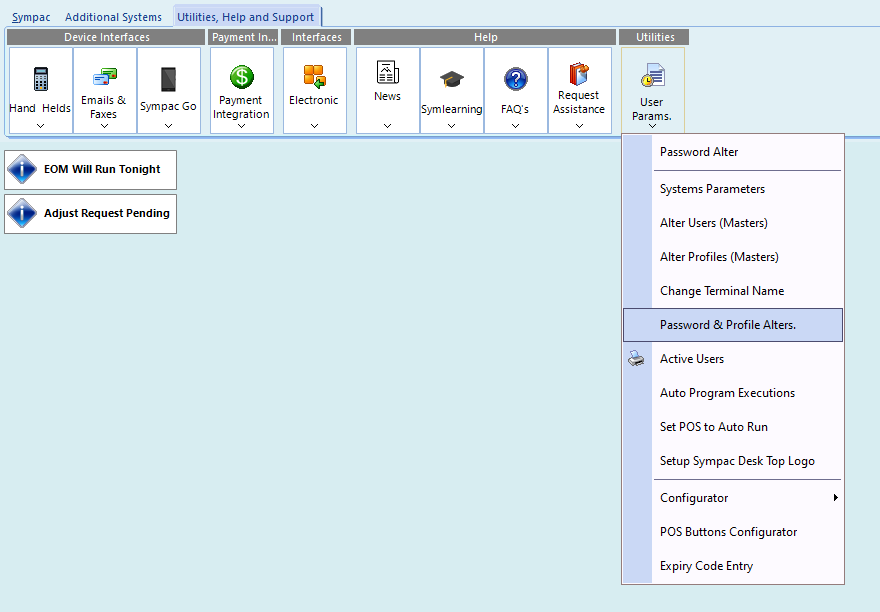
- Go to the Utilities, Help and Support area on your Sympac Desktop
- Select “Password & Profile Alters”
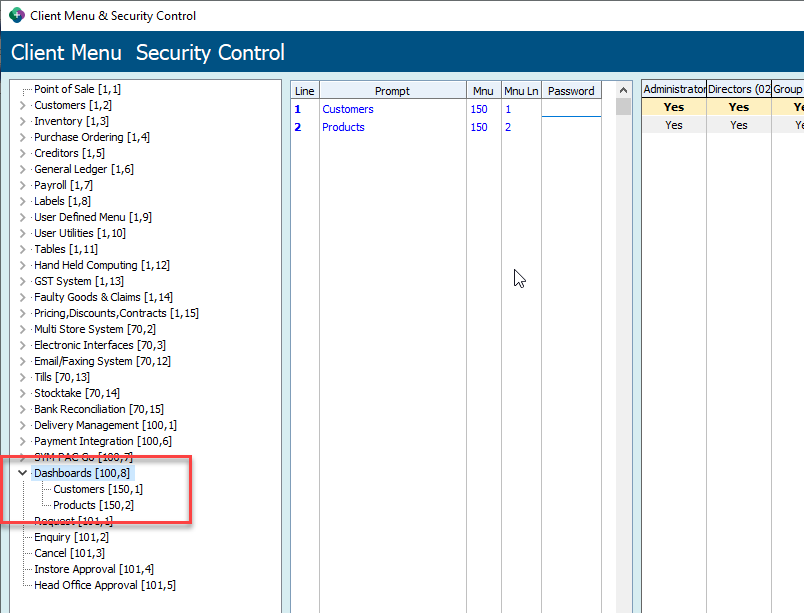
- Open Client Menu Security Control
- Locate the Dashboards area in the menu list
- Set access to Yes or No depending on the permissions you want to grant
- The screenshots here will assist you in setting this up (click on each to view in a larger screen).
We’re here to help!
If you need any assistance or have any questions please call the Sympac Help Desk on (03) 5649 6200. Our Client Services Team are available from 7am to 8pm EST to assist you.